
App: v1.41.0Unity Plugin: v0.128.1Unreal Engine Plugin: v0.13.3
NEW:
- [Unity] Bezi can now manage and kick off builds using actions
- [Unity] Bezi can now work with Shader Graph, Post Processing, and other nested assets using actions
- Credit Bundles can now be offered to teams. Teams that need more credits than their plan includes can now get a prepaid block of credits through our team. Bundle credits are used after your plan credits and before on-demand, carry over month to month until they expire, and show up on your Usage page and in the desktop account view.
- Added Gemini 4 Argon as a featured model with low, medium (default), and high thinking levels
- Auto Mode is now enabled by default. With Auto Mode enabled, tools and actions that required human approval will be auto-approved if they are judged to be safe. You can opt-out in the Advanced Settings menu.
- Auto Mode can now auto-approve more tools and actions, including Custom Actions and Execute C#.
- Improved narrow connections settings layout
- The Usage page now shows your on-demand credit total alongside your plan credits.
- The credit usage bar no longer overflows or hides segments when you hit your limit.
createOrUpdateSerializedObjectmerged intocreateOrUpdateAsset(ScriptableObjectsub-assets now supported).
- Addressed cases where a thread would stop auto-scrolling mid response
- Fixed loading of screenshots in old thread action components
- Addresses cases of tooltips appearing in top left of the Bezi window
- Fixed an issue where newly added blueprint nodes might end up in the middle of a graph if that graph was under a comment (and other layout issues).
- Fixed an issue where Bezi could not find C++ files in a project that was converted from a blueprint project to a C++ project
NEW:
- Added new Unity actions for NavMesh, Lighting, and Occlusion baking
- Updates to the app and engine plugins will now be delivered more seamlessly, without requiring a new download
- Consolidate various file and directory related tools into using shell tool
- Actions UI improvements
- Character and windowing fixes
Run terminal commands on your computer
NEW:- Shell tool to run terminal commands on your computer in Agent Mode
- Optional Auto Mode for Bezi agent and subagents (general and custom)
- Examples of how to use it: manage Git workflows, build and test your project, automate file operations, and run local development tools
- Bezi can describe and inspect the contents of DLLs in Unity projects
- Bezi works with Plans more freely in Agent mode
- Bezi can duplicate game objects
- Prompts that only have attachments (images, files) can be submitted without text
- Hanging submissions can be cancelled more reliably
- Fixed support for Unity 6.7 beta
- Fixed a bug where subagents might time out if they work longer than 10 minutes
- Fixed a bug where parallel creation of pages would create multiple folder copies
- Usability improvements
- Improved Blueprint Re-layout implementation: Now Bezi properly uses re-route nodes to re-route wires around other nodes. Bezi now is also able to use Blueprint functions to break down complex graphs.
- Note: Bezi still applies the re-layout to the entire BP even if some parts were not modified. This is a known issue and will be fixed in the next release.
- Further improved performance of large action batches: Now BNezi does not slow down even if it is running a action script with +5000 actions
- Reduced memory usage when large action batches are running
- Improved Blueprint Re-layout implementation: Now Bezi properly uses re-route nodes to re-route wires around other nodes. Bezi now is also able to use Blueprint functions to break down complex graphs.
- Bug fixes
- Fixed a crash that could happen when Bezi stops PIE after interacting with World referenced objects (like GameState)
Custom Subagents
NEW- Bezi supports custom subagents to execute complex tasks faster
- Pre-define models & system prompts to add consistent multi-agent workflows to Bezi
- Bezi can execute one-off C# scripts directly in your Unity project, without recompilation. For now they prompt you for approval, due to their unsandboxed nature
- Role-specific new user onboarding experience, to support project and workspace setup
- Improved Play Mode support in Agent, Plan, and Ask Modes
- Improved sidebar navigation
- Updated Unity project picker instructions to clarify how to refresh Unity Hub projects
- Bezi can place images from a thread into pages (whether uploaded or created by tools)
- Added Claude Sonnet 5.5: Better quality, same price as Sonnet 5
- Fixed NullReferenceException when selecting objects in Unity in some cases
- Fixed slow Domain Reload in some projects which have many files
- Usability improvements
- Action execution is now up to ~15x faster for select tasks that require executing +1000 actions. New execution updates allow Bezi to run a large number of actions in the editor as fast as possible
- Improved the rendering performance in threads where Bezi executed thousands of actions (scrolling performance and thread loading performance)
- Bug fixes
- Fixed an issue where Bezi could not start PIE if there are Blueprint compile errors
- Fixed a warning in UE 5.4 where a plugin dependency was not explicitly defined
Unreal Early Access, UI Updates, and Models
NEW: Unreal Early Access, Interface Update, New Models- Bezi’s Unreal support is in early access! Sign-up to be an early tester:
- Interface was reorganized to support multi-task work:
- Parallel threads are more visibile, so you can monitor multiple tasks simultaneously
- Threads live next to Pages in the left sidebar
- Cleaned up navigation modes to keep left sidebar clean and focused.
- Settings moved to left sidebar
- Added Claude Opus 5.5: Anthropic’s new frontier model, outstanding 3D capabilities, less expensive than Fable 5.1
- Added GPT-6 Sol and GPT-6 Luna: great 3D capabilities at much lower cost (50% cost of the GPT-5.6 counterparts, better at all game dev tasks)
- Upgraded GLM 5.2 to GLM 5.3 Flash: GLM 5.3 has vision capabilities (critical for game dev tasks) and is less expensive
- Bezi can generate and execute one-off C# scripts, without recompilation. You will be prompted to approve these actions because they’re not sandboxed
- Subagent threads show executing model and thinking effort
- Actions now work natively with DontDestroyOnLoad objects
- Improved consistency when using actions in a workspace with no connected Unity projects
- When Unity crashes, Bezi can now cancel pending tool calls and respond with suggestions
- When Bezi encounters an error it will no longer suggest rerunning the previous prompt
- Improved Unity Plugin connection/reconnection stability after disruptions (computer sleep, Unity crashes, etc)
- Fix some cases where Unity would hang after Bezi triggers a recompilation
-
Fix some cases where Bezi would fail to run actions in a workspace with multiple projects
.png?fit=max&auto=format&n=Wm1ZvY3bf14mC1xl&q=85&s=a979c74e71d270c3c2aaca46cdf94ab0)
New
- Import markdown files into Bezi as Pages! Import from Claude, folders, ZIPs, and file drops to ramp Bezi up on existing context
- Improved Skill import reliability; accepts common SKILL.md formatting like unquoted colons and tab indents
- Proofs enhancements:
- now multiple files and can now support relative resources
- can package skills and Unity custom actions
- can view local filesystem
- Proof data can be updated even when a proof is not in focus
- MCPs can now be used without a connected project
- Pasting a large block of text in a thread auto-creates an attachment
- Ctrl+Shift+V (Cmd+Shift+V) pastes the full text into the text area instead
- Fixed deeply nested pages disappearing until restart when dragged between the shared and private page sections
- Resolved bugs with Enter and Exit Play Mode actions work when Bezi is unfocused
- Fixed Unity crash due to infinite loop in Bezi serializer
- Fixed missing app notification when Bezi needs user input
NEW: models & automated self-checking loops!
New- Agent mode works in Play Mode: execute fully automated edit-play-verify-iterate loops with Bezi
- New models: GPT-6 Astra & Claude Fable 5.1
- You can submit prompts with no project connected
- New Actions: control the play and pause state of the editor, the open and closed scenes, and the current selection
- All text-based file extensions are supported
- Bezi can ask follow up questions in all modes, not just Plan mode
- Bezi can use tools that do not require Unity connection without running the engine
- Bezi can now read and modify Project Settings directly, including custom SettingsProvider objects
Usability improvements
- Resolved high compilation times and CPU usage when Unity recompiles with the Bezi Plugin
- Improved reliability of checkpoint undo
- Fix Bezi occasionally getting confused about missing actions if a thread is started mid-recompilation
- Fixed resume plan after follow-up questions are answered
- Fixed a bug where after any page is deleted, Bezi would navigate to Home
- Prevent Bezi from getting stuck or using stale rules when switching into plan mode
- Restored directory search in
@mentions - Now shows full file paths in
@mention tooltips and keep tooltips in the viewport
NEW: Custom Actions
- Custom Actions: build Custom Actions to provide Bezi with specialized C# functionality (beyond what’s covered by Bezi Actions)
- Build Custom Actions automatically using Bezi or manually with C#
- Bezi works with Package Manager: install packages, manage registries, export and import packages
- Bezi can now read text files attached to a thread
- Attaching a ZIP to a thread will now extract and attach its contents
- Removed the 10 calls per workflow limit on MCPs
- Proofs can send prompts to the current thread
- Pages can be duplicated
- Pages can be transferred between workspaces
- Fixed the Unity Profiler action sometimes returning blank data
- Fixed some situations that prevented Bezi from running Actions
NEW: Proofs
Proofs: Create visual inputs (lightweight, interactive tools or prototypes) in Bezi- Great for tasks that require more rich context than text alone
- Quickly test/iterate on an idea before committing to build in-engine
- Inspiration gallery: https://www.bezi.com/proofs
- Improved skill naming and visibility
- Separated plan credits from on-demand usage credits for more granular tracking
- Added more languages to syntax highlighting in code editors and proofs
- Improved subscription upgrade and auto-reimbursement flows for annual plans
- Team members now see the Team account dashboard by default
- Fixed slow tool recovery and tool calls, code-generation length-limit failures, and empty agent responses
- Fixed editing behavior in name fields and page-creation text wrapping
- Fixed checkpoint-restores automatically accepting pending changes
- Fixed inaccessible shared pages being referenced by Bezi
Usability improvements
- Skills can be exported/imported via App Settings
- Added a “copy” button for Page content
- Improved embedded media in Pages; upload reliability, save behavior, file tracking
- Clarified subscription cancellation verbiage
- Improved Actions execution when Unity is in the background
- Improved the empty state when searching skills with no matches
- Reduced cost and latency of retrieving action definitions by ~17%
- Improved Pages reliability: fixed pinned pages renaming to “Untitled,” incorrect page -history in Settings, and better breadcrumb behavior in nested folders
- Removed the “Plans” option from Make Page settings
- Fixed the Team plan upgrade prompt appearing incorrectly
- Fixed several Actions reliability and compilation issues
NEW: Bezi Actions & Image Embeds!
- Pages now support image embeds! (great for UI - see image)
- Bezi Actions overhaul to reduce cost and improve performance across all models
- Bezi Actions: 6 new capabilities
- Generate animation clips, sequence cinematic content
- Setup advanced Mecanim BlendTrees
- Debug broken functionality and auto-iterate until desired behavior is met (Test Runner)
- Create and update Input Systems
- Create, update and view Particle Systems
- Analyze Profiler performance data, implement optimizations
- Removed workspace limits for all plan levels
- Better support of Feel and TDE packages
- Unity Hub projects now auto-discovered in Add Unity project
- Page blocks can be reorganized with drag-and-drop
- Added support for block selection
- Added support for search @mentions in pages, plans and project rules
- UI fix where model change popover was cut off in thread
- Will now ignore blank/invalid values in isolated view screenshot requests
- Fixed a workflow crash with a GPT model’s thinking configuration
- Fixed mismatches mention icon text color
- Fixed misalignment between mentions
.png?fit=max&auto=format&n=oY9fay0F_WY99x7W&q=85&s=bb2a0ac30bfe1b4839b632b1490a1cd7)
Usability improvements
- Improved ability for Actions to handle larger tasks at lower cost
- Added confirmation step to prevent trial cancellation
- Improved wording of error popup when org limit is reached
- Compressing images prior to upload
- Fixed several issues when Bezi would lose connection or terminate workflow after a failed tool call to Unity
- Fixed a bug where compilation requests hung on disconnected targets
- Fixed connection status error causing blocked input
- Detect and escape unbalanced parentheses in grep queries
- Restores view setup after screenshot action failure
- Fixed a bug where Bezi UI stopped updating during parallel LLM generation
- Remove duplicate error sections in action execution batches
- Fixed excessive scroll bars appearing
- Fixed subscription inactive warning shows for annual plans near usage cap
- Fixed a bug where deleted assets may be returned by editor APIs to list assets
- Fixed a bug where duplicate customer payment profiles caused sign-in issues
- Fixed display of credit numbers in web app for lower tier plans
- Fixed UI issue showing incorrect diff values for added lines
- Show invited org after accepting an invite
- Redirect used invite links to the web app for logged-in users
- Fixed usage bar doesn’t reach the end when limit is exceeded
- Removed on-demand usage for free trial
NEW
- Nested subfolders supported for Pages!
- Enterprise account Admins can view and limit member credit usage
- New UGUI Default Skill: quickly implement UI using UGUI from a screenshot or Figma file
- You can now independently accept/reject changes in parallel threads
- Ability to pin folders
- Improved rendering of pinned resources, @ mentions, and skill commands
- Improved Oversized Markdown Handling
- Added a progress bar animation for app loads and workspace switches
- Renders Unity Shaders several frames forward, so the screenshot is representative
- Fixed subagent errors on GPT models
- Several fixes and performance improvements to Bezi Actions
- Fixed global state of domain recompilation when working in multiple Unity projects in parallel
- Fixed Bezi disconnecting from Unity in Multiplayer Play Mode
- Fixed Unity logs warning for invalid quaternion rotation
NEW
- NEW GPT MODELS: Luna, Sol, Terra
- New featured MCP connections: Blender, Miro, Perforce, Trello
- Improved grep search performance
- Real-time Collaborative Pages improvements
- Improved handling for session expired state
- Performance improvements to loading collaborative pages
- Added back the missing reset to default button in Your Rules tab
- Fixed memory leak in collaborative pages
- Fixed display issue for users without names on collab pages
- Fixed drag-drop of workspace nodes in the collaborative pages
- Updated the message for accepting changes from another project in current project
- Enforced Bezi Trial policy in the application and updated in-app messaging for it
- Fixed a bug where Bezi would trigger Unity blocking popup during restore
- Fixed a bug where Bezi would trigger save popup for prefabs
- Fixed the bug where entering Play Mode would throw Bezi type load errors
- Fixed the Unity 6.5 SceneView rotation warning in 2D mode
- Fixed SearchAssetsByQuery due to InstanceID deprication
- Fixed the SaveScene error in Unity plugin in Ask mode
- Fixed a bug where Bezi reverted unsaved changes in additively loaded scenes
- Fixed the occasional error screen when loading the app
- Fixed a type validation error for Actions
- Fixed the crash when inputting [@…] into prompt
- Fixed a bug where Workspace switcher menu overflows narrow left panel
- Updated the redirect to Home when page not found after login
- Fixed a bug where the app would enter refresh loop on logout
- Removed console warning for unsupported HSL color format on macOS
- Fixed dimensions error when submitting prompts with image attachments
- Fixed a bug where chat area suddenly scrolls down and leaves empty screen
- Fixed the trailing @ remains after deleting skill name in thread
- Fixed occasional subagent error on compaction for deepseek-v4-flash
- Disabled prompting when the target project is disabled
- Fixed avatar image loading and unassigned seat visuals for Team plans
Now Introducing: Skills & Direct Model Selection
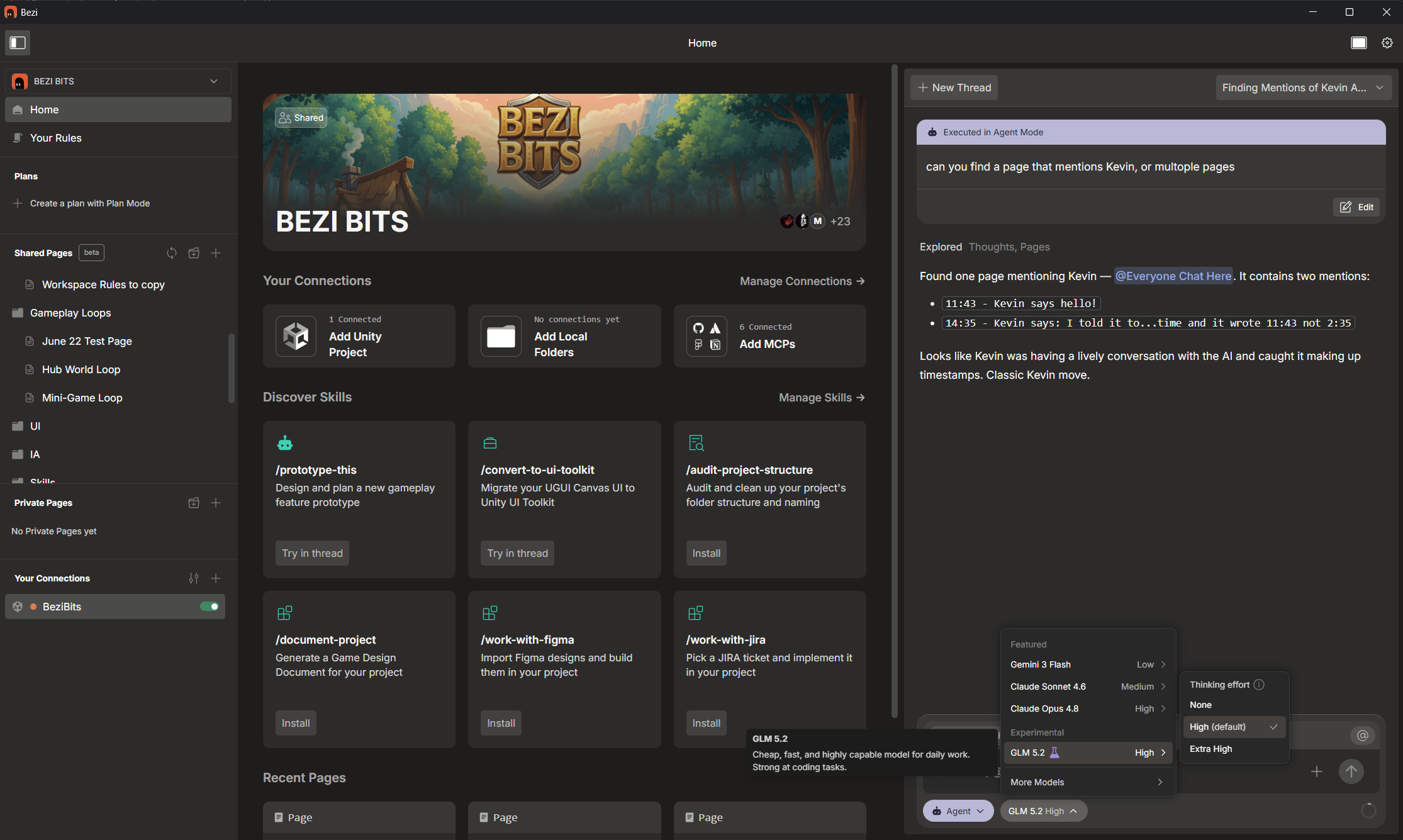
NEW: Skills!!- Extend what Bezi can do and standardize repeated workflows
- Let Bezi automate complex tasks by packaging repetitive, multi-step workflows into a single command. Use default Bezi skills or create custom skills for a workflow
- Default Skills options include:
UGUI > UI Toolkit ConversionorCreate Documentation - Learn more: https://docs.bezi.com/fundamentals/skills
- You can now select a specific model from the menu (see image)
- Added GLM 5.2 model: performant and cheap, great for daily work
- Added Claude Sonnet 5 model: next-gen sonnet offering
- Safer defaults for model capabilities, e.g. disabled image output for models that don’t support it
- Updated model descriptions and compaction/model-provider tuning
- Updated Bezi’s Home interface for better management of workspaces, projects and skills
- New detailed view of token usage and plan usage in Home
- Improved MCP tool serialization
- Fixed private pages that failed to load when collaboration is turned on
- Reduced failed sync requests and validated collaboration-server behavior
- Reduced token-usage spikes in websocket-related flows
- Fixed several save-flow and scene-state blockers, including screenshot-triggered scene creation, missing-script save popups, unsaved-scene handling, and action failures despite healthy Unity connection state
- Fixed Notion MCP setup hallucinations and MCP-cap limit behavior
- Removed outdated Pages word-count UI
- Fixed Unity save-scene prompts when taking screenshots
- Fixed sync polling so it stops on automatic logout after 401 responses
- Fixed the explored dropdown jumping while tools are being called
- Fixed a bug that made Shared pages load very slowly
Now Introducing: Opus 4.8 and real-time collaborative pages!
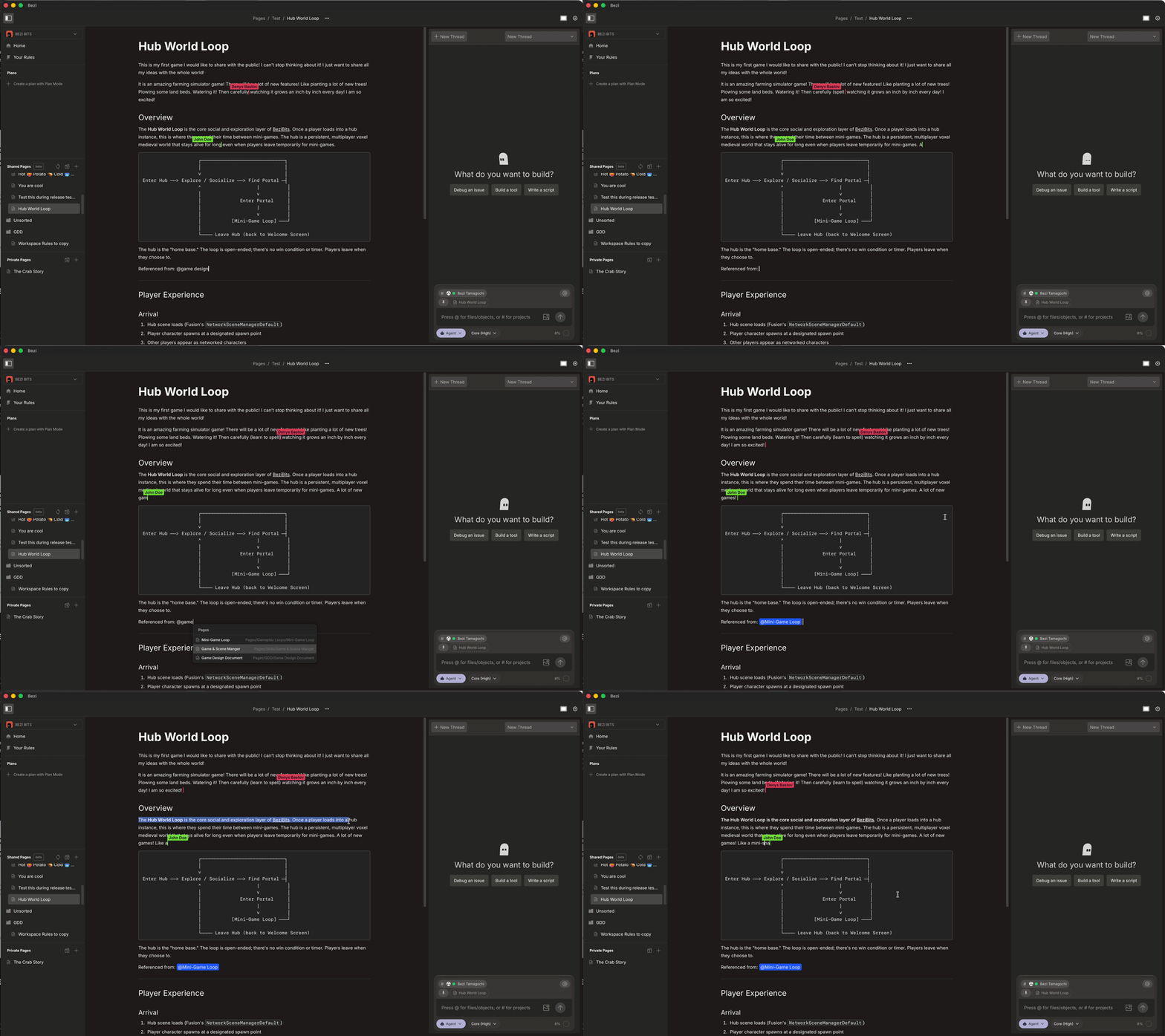
New: real-time collaborative pages- Shared Pages (available in Teams) now support real-time collaboration. When more than one person has a Shared Page open, you see each other’s cursors and see text appear as it’s typed.
- The person editing a paragraph is visible to everyone viewing the page. Everyone’s edits merge automatically as you go, so there’s nothing to manually save and no merge conflicts to resolve.
- Real-time collaboration covers people’s manual edits. Edits Bezi makes to a Shared Page on your behalf will appear once it’s done editing.
- Frontier now uses Opus 4.8
- Context window is expanded 2x
- Improved speed and accuracy of thread compaction
- Outstanding payments are now invoiced before a new subscription can be created
- Improved compilation of Bezi Actions when submitting consecutive messages in a thread
- Added progressive generation of Actions to improve speed
- Included Plans in page list searches
- Enabled aborting Action batches
- Several improvements to recompilation triggers - after deleting scripts and DLLs
- Grouped Actions by modules in Unity
- Fixed occasional file watcher errors
- Fixed Actions checkpointing not working with subagents
- Fixed a UI bug where header overlayed scrollbar in Pages
- Fixed a bug where listing folders recursively would return incomplete lists
- Fixed a bug that broke moving pages via right
- Undo All does not remove created material now
- Fixed an occasional crash in Bezi
- Removed some Unity console messages on first install
- Fixed a bug where Bezi failed to recompile on assembly reference edits
- Forces Unity recompilation after script changes and deletes
Now Introducing: Skills & Direct Model Selection
NEW: Skills!!- Extend what Bezi can do and standardize repeated workflows
- Let Bezi automate complex tasks by packaging repetitive, multi-step workflows into a single command. Use default Bezi skills or create custom skills for a workflow
- Default Skills options include:
UGUI > UI Toolkit ConversionorCreate Documentation - Learn more: https://docs.bezi.com/fundamentals/skills
- You can now select a specific model from the menu (see image)
- Added GLM 5.2 model: performant and cheap, great for daily work
- Added Claude Sonnet 5 model: next-gen sonnet offering
- Safer defaults for model capabilities, e.g. disabled image output for models that don’t support it
- Updated model descriptions and compaction/model-provider tuning
- Updated Bezi’s Home interface for better management of workspaces, projects and skills
- New detailed view of token usage and plan usage in Home
- Improved MCP tool serialization
- Fixed private pages that failed to load when collaboration is turned on
- Reduced failed sync requests and validated collaboration-server behavior
- Reduced token-usage spikes in websocket-related flows
- Fixed several save-flow and scene-state blockers, including screenshot-triggered scene creation, missing-script save popups, unsaved-scene handling, and action failures despite healthy Unity connection state
- Fixed Notion MCP setup hallucinations and MCP-cap limit behavior
- Removed outdated Pages word-count UI
- Fixed Unity save-scene prompts when taking screenshots
- Fixed sync polling so it stops on automatic logout after 401 responses
- Fixed the explored dropdown jumping while tools are being called
- Fixed a bug that made Shared pages load very slowly
Now Introducing: Opus 4.8 and real-time collaborative pages!
New: real-time collaborative pages- Shared Pages (available in Teams) now support real-time collaboration. When more than one person has a Shared Page open, you see each other’s cursors and see text appear as it’s typed.
- The person editing a paragraph is visible to everyone viewing the page. Everyone’s edits merge automatically as you go, so there’s nothing to manually save and no merge conflicts to resolve.
- Real-time collaboration covers people’s manual edits. Edits Bezi makes to a Shared Page on your behalf will appear once it’s done editing.
- Frontier now uses Opus 4.8
- Context window is expanded 2x
- Improved speed and accuracy of thread compaction
- Outstanding payments are now invoiced before a new subscription can be created
- Improved compilation of Bezi Actions when submitting consecutive messages in a thread
- Added progressive generation of Actions to improve speed
- Included Plans in page list searches
- Enabled aborting Action batches
- Several improvements to recompilation triggers - after deleting scripts and DLLs
- Grouped Actions by modules in Unity
- Fixed occasional file watcher errors
- Fixed Actions checkpointing not working with subagents
- Fixed a UI bug where header overlayed scrollbar in Pages
- Fixed a bug where listing folders recursively would return incomplete lists
- Fixed a bug that broke moving pages via right
- Undo All does not remove created material now
- Fixed an occasional crash in Bezi
- Removed some Unity console messages on first install
- Fixed a bug where Bezi failed to recompile on assembly reference edits
- Forces Unity recompilation after script changes and deletes
Now Introducing: Opus 4.8 and real-time collaborative pages!
New: real-time collaborative pages- Shared Pages (available in Teams) now support real-time collaboration. When more than one person has a Shared Page open, you see each other’s cursors and see text appear as it’s typed.
- The person editing a paragraph is visible to everyone viewing the page. Everyone’s edits merge automatically as you go, so there’s nothing to manually save and no merge conflicts to resolve.
- Real-time collaboration covers people’s manual edits. Edits Bezi makes to a Shared Page on your behalf will appear once it’s done editing.
- Frontier now uses Opus 4.8
- Context window is expanded 2x
- Improved speed and accuracy of thread compaction
- Outstanding payments are now invoiced before a new subscription can be created
- Improved compilation of Bezi Actions when submitting consecutive messages in a thread
- Added progressive generation of Actions to improve speed
- Included Plans in page list searches
- Enabled aborting Action batches
- Several improvements to recompilation triggers - after deleting scripts and DLLs
- Grouped Actions by modules in Unity
- Fixed occasional file watcher errors
- Fixed Actions checkpointing not working with subagents
- Fixed a UI bug where header overlayed scrollbar in Pages
- Fixed a bug where listing folders recursively would return incomplete lists
- Fixed a bug that broke moving pages via right
- Undo All does not remove created material now
- Fixed an occasional crash in Bezi
- Removed some Unity console messages on first install
- Fixed a bug where Bezi failed to recompile on assembly reference edits
- Forces Unity recompilation after script changes and deletes
Now Introducing: Opus 4.8 and real-time collaborative pages!
New: real-time collaborative pages- Shared Pages (available in Teams) now support real-time collaboration. When more than one person has a Shared Page open, you see each other’s cursors and see text appear as it’s typed.
- The person editing a paragraph is visible to everyone viewing the page. Everyone’s edits merge automatically as you go, so there’s nothing to manually save and no merge conflicts to resolve.
- Real-time collaboration covers people’s manual edits. Edits Bezi makes to a Shared Page on your behalf will appear once it’s done editing.
- Frontier now uses Opus 4.8
- Context window is expanded 2x
- Improved speed and accuracy of thread compaction
- Outstanding payments are now invoiced before a new subscription can be created
- Improved compilation of Bezi Actions when submitting consecutive messages in a thread
- Added progressive generation of Actions to improve speed
- Included Plans in page list searches
- Enabled aborting Action batches
- Several improvements to recompilation triggers - after deleting scripts and DLLs
- Grouped Actions by modules in Unity
- Fixed occasional file watcher errors
- Fixed Actions checkpointing not working with subagents
- Fixed a UI bug where header overlayed scrollbar in Pages
- Fixed a bug where listing folders recursively would return incomplete lists
- Fixed a bug that broke moving pages via right
- Undo All does not remove created material now
- Fixed an occasional crash in Bezi
- Removed some Unity console messages on first install
- Fixed a bug where Bezi failed to recompile on assembly reference edits
- Forces Unity recompilation after script changes and deletes
Now Introducing: Skills & Direct Model Selection
NEW: Skills!!- Extend what Bezi can do and standardize repeated workflows
- Let Bezi automate complex tasks by packaging repetitive, multi-step workflows into a single command. Use default Bezi skills or create custom skills for a workflow
- Default Skills options include:
UGUI > UI Toolkit ConversionorCreate Documentation - Learn more: https://docs.bezi.com/fundamentals/skills
- You can now select a specific model from the menu (see image)
- Added GLM 5.2 model: performant and cheap, great for daily work
- Added Claude Sonnet 5 model: next-gen sonnet offering
- Safer defaults for model capabilities, e.g. disabled image output for models that don’t support it
- Updated model descriptions and compaction/model-provider tuning
- Updated Bezi’s Home interface for better management of workspaces, projects and skills
- New detailed view of token usage and plan usage in Home
- Improved MCP tool serialization
- Fixed private pages that failed to load when collaboration is turned on
- Reduced failed sync requests and validated collaboration-server behavior
- Reduced token-usage spikes in websocket-related flows
- Fixed several save-flow and scene-state blockers, including screenshot-triggered scene creation, missing-script save popups, unsaved-scene handling, and action failures despite healthy Unity connection state
- Fixed Notion MCP setup hallucinations and MCP-cap limit behavior
- Removed outdated Pages word-count UI
- Fixed Unity save-scene prompts when taking screenshots
- Fixed sync polling so it stops on automatic logout after 401 responses
- Fixed the explored dropdown jumping while tools are being called
- Fixed a bug that made Shared pages load very slowly
Now Introducing: Opus 4.8 and real-time collaborative pages!
New: real-time collaborative pages- Shared Pages (available in Teams) now support real-time collaboration. When more than one person has a Shared Page open, you see each other’s cursors and see text appear as it’s typed.
- The person editing a paragraph is visible to everyone viewing the page. Everyone’s edits merge automatically as you go, so there’s nothing to manually save and no merge conflicts to resolve.
- Real-time collaboration covers people’s manual edits. Edits Bezi makes to a Shared Page on your behalf will appear once it’s done editing.
- Frontier now uses Opus 4.8
- Context window is expanded 2x
- Improved speed and accuracy of thread compaction
- Outstanding payments are now invoiced before a new subscription can be created
- Improved compilation of Bezi Actions when submitting consecutive messages in a thread
- Added progressive generation of Actions to improve speed
- Included Plans in page list searches
- Enabled aborting Action batches
- Several improvements to recompilation triggers - after deleting scripts and DLLs
- Grouped Actions by modules in Unity
- Fixed occasional file watcher errors
- Fixed Actions checkpointing not working with subagents
- Fixed a UI bug where header overlayed scrollbar in Pages
- Fixed a bug where listing folders recursively would return incomplete lists
- Fixed a bug that broke moving pages via right
- Undo All does not remove created material now
- Fixed an occasional crash in Bezi
- Removed some Unity console messages on first install
- Fixed a bug where Bezi failed to recompile on assembly reference edits
- Forces Unity recompilation after script changes and deletes
Now Introducing: Opus 4.8 and real-time collaborative pages!
New: real-time collaborative pages- Shared Pages (available in Teams) now support real-time collaboration. When more than one person has a Shared Page open, you see each other’s cursors and see text appear as it’s typed.
- The person editing a paragraph is visible to everyone viewing the page. Everyone’s edits merge automatically as you go, so there’s nothing to manually save and no merge conflicts to resolve.
- Real-time collaboration covers people’s manual edits. Edits Bezi makes to a Shared Page on your behalf will appear once it’s done editing.
- Frontier now uses Opus 4.8
- Context window is expanded 2x
- Improved speed and accuracy of thread compaction
- Outstanding payments are now invoiced before a new subscription can be created
- Improved compilation of Bezi Actions when submitting consecutive messages in a thread
- Added progressive generation of Actions to improve speed
- Included Plans in page list searches
- Enabled aborting Action batches
- Several improvements to recompilation triggers - after deleting scripts and DLLs
- Grouped Actions by modules in Unity
- Fixed occasional file watcher errors
- Fixed Actions checkpointing not working with subagents
- Fixed a UI bug where header overlayed scrollbar in Pages
- Fixed a bug where listing folders recursively would return incomplete lists
- Fixed a bug that broke moving pages via right
- Undo All does not remove created material now
- Fixed an occasional crash in Bezi
- Removed some Unity console messages on first install
- Fixed a bug where Bezi failed to recompile on assembly reference edits
- Forces Unity recompilation after script changes and deletes
Now Introducing: Opus 4.8 and real-time collaborative pages!
New: real-time collaborative pages- Shared Pages (available in Teams) now support real-time collaboration. When more than one person has a Shared Page open, you see each other’s cursors and see text appear as it’s typed.
- The person editing a paragraph is visible to everyone viewing the page. Everyone’s edits merge automatically as you go, so there’s nothing to manually save and no merge conflicts to resolve.
- Real-time collaboration covers people’s manual edits. Edits Bezi makes to a Shared Page on your behalf will appear once it’s done editing.
- Frontier now uses Opus 4.8
- Context window is expanded 2x
- Improved speed and accuracy of thread compaction
- Outstanding payments are now invoiced before a new subscription can be created
- Improved compilation of Bezi Actions when submitting consecutive messages in a thread
- Added progressive generation of Actions to improve speed
- Included Plans in page list searches
- Enabled aborting Action batches
- Several improvements to recompilation triggers - after deleting scripts and DLLs
- Grouped Actions by modules in Unity
- Fixed occasional file watcher errors
- Fixed Actions checkpointing not working with subagents
- Fixed a UI bug where header overlayed scrollbar in Pages
- Fixed a bug where listing folders recursively would return incomplete lists
- Fixed a bug that broke moving pages via right
- Undo All does not remove created material now
- Fixed an occasional crash in Bezi
- Removed some Unity console messages on first install
- Fixed a bug where Bezi failed to recompile on assembly reference edits
- Forces Unity recompilation after script changes and deletes
Now Introducing: Skills & Direct Model Selection
NEW: Skills!!- Extend what Bezi can do and standardize repeated workflows
- Let Bezi automate complex tasks by packaging repetitive, multi-step workflows into a single command. Use default Bezi skills or create custom skills for a workflow
- Default Skills options include:
UGUI > UI Toolkit ConversionorCreate Documentation - Learn more: https://docs.bezi.com/fundamentals/skills
- You can now select a specific model from the menu (see image)
- Added GLM 5.2 model: performant and cheap, great for daily work
- Added Claude Sonnet 5 model: next-gen sonnet offering
- Safer defaults for model capabilities, e.g. disabled image output for models that don’t support it
- Updated model descriptions and compaction/model-provider tuning
- Updated Bezi’s Home interface for better management of workspaces, projects and skills
- New detailed view of token usage and plan usage in Home
- Improved MCP tool serialization
- Fixed private pages that failed to load when collaboration is turned on
- Reduced failed sync requests and validated collaboration-server behavior
- Reduced token-usage spikes in websocket-related flows
- Fixed several save-flow and scene-state blockers, including screenshot-triggered scene creation, missing-script save popups, unsaved-scene handling, and action failures despite healthy Unity connection state
- Fixed Notion MCP setup hallucinations and MCP-cap limit behavior
- Removed outdated Pages word-count UI
- Fixed Unity save-scene prompts when taking screenshots
- Fixed sync polling so it stops on automatic logout after 401 responses
- Fixed the explored dropdown jumping while tools are being called
- Fixed a bug that made Shared pages load very slowly
Now Introducing: Opus 4.8 and real-time collaborative pages!
New: real-time collaborative pages- Shared Pages (available in Teams) now support real-time collaboration. When more than one person has a Shared Page open, you see each other’s cursors and see text appear as it’s typed.
- The person editing a paragraph is visible to everyone viewing the page. Everyone’s edits merge automatically as you go, so there’s nothing to manually save and no merge conflicts to resolve.
- Real-time collaboration covers people’s manual edits. Edits Bezi makes to a Shared Page on your behalf will appear once it’s done editing.
- Frontier now uses Opus 4.8
- Context window is expanded 2x
- Improved speed and accuracy of thread compaction
- Outstanding payments are now invoiced before a new subscription can be created
- Improved compilation of Bezi Actions when submitting consecutive messages in a thread
- Added progressive generation of Actions to improve speed
- Included Plans in page list searches
- Enabled aborting Action batches
- Several improvements to recompilation triggers - after deleting scripts and DLLs
- Grouped Actions by modules in Unity
- Fixed occasional file watcher errors
- Fixed Actions checkpointing not working with subagents
- Fixed a UI bug where header overlayed scrollbar in Pages
- Fixed a bug where listing folders recursively would return incomplete lists
- Fixed a bug that broke moving pages via right
- Undo All does not remove created material now
- Fixed an occasional crash in Bezi
- Removed some Unity console messages on first install
- Fixed a bug where Bezi failed to recompile on assembly reference edits
- Forces Unity recompilation after script changes and deletes
Now Introducing: Opus 4.8 and real-time collaborative pages!
New: real-time collaborative pages- Shared Pages (available in Teams) now support real-time collaboration. When more than one person has a Shared Page open, you see each other’s cursors and see text appear as it’s typed.
- The person editing a paragraph is visible to everyone viewing the page. Everyone’s edits merge automatically as you go, so there’s nothing to manually save and no merge conflicts to resolve.
- Real-time collaboration covers people’s manual edits. Edits Bezi makes to a Shared Page on your behalf will appear once it’s done editing.
- Frontier now uses Opus 4.8
- Context window is expanded 2x
- Improved speed and accuracy of thread compaction
- Outstanding payments are now invoiced before a new subscription can be created
- Improved compilation of Bezi Actions when submitting consecutive messages in a thread
- Added progressive generation of Actions to improve speed
- Included Plans in page list searches
- Enabled aborting Action batches
- Several improvements to recompilation triggers - after deleting scripts and DLLs
- Grouped Actions by modules in Unity
- Fixed occasional file watcher errors
- Fixed Actions checkpointing not working with subagents
- Fixed a UI bug where header overlayed scrollbar in Pages
- Fixed a bug where listing folders recursively would return incomplete lists
- Fixed a bug that broke moving pages via right
- Undo All does not remove created material now
- Fixed an occasional crash in Bezi
- Removed some Unity console messages on first install
- Fixed a bug where Bezi failed to recompile on assembly reference edits
- Forces Unity recompilation after script changes and deletes
Now Introducing: Opus 4.8 and real-time collaborative pages!
New: real-time collaborative pages- Shared Pages (available in Teams) now support real-time collaboration. When more than one person has a Shared Page open, you see each other’s cursors and see text appear as it’s typed.
- The person editing a paragraph is visible to everyone viewing the page. Everyone’s edits merge automatically as you go, so there’s nothing to manually save and no merge conflicts to resolve.
- Real-time collaboration covers people’s manual edits. Edits Bezi makes to a Shared Page on your behalf will appear once it’s done editing.
- Frontier now uses Opus 4.8
- Context window is expanded 2x
- Improved speed and accuracy of thread compaction
- Outstanding payments are now invoiced before a new subscription can be created
- Improved compilation of Bezi Actions when submitting consecutive messages in a thread
- Added progressive generation of Actions to improve speed
- Included Plans in page list searches
- Enabled aborting Action batches
- Several improvements to recompilation triggers - after deleting scripts and DLLs
- Grouped Actions by modules in Unity
- Fixed occasional file watcher errors
- Fixed Actions checkpointing not working with subagents
- Fixed a UI bug where header overlayed scrollbar in Pages
- Fixed a bug where listing folders recursively would return incomplete lists
- Fixed a bug that broke moving pages via right
- Undo All does not remove created material now
- Fixed an occasional crash in Bezi
- Removed some Unity console messages on first install
- Fixed a bug where Bezi failed to recompile on assembly reference edits
- Forces Unity recompilation after script changes and deletes
New
- Added support for adding scenes to the build list
- Added support for referencing sub-assets
- Added a button to copy message response
- Improved app load time from 12s to 4s average
- Improved compaction, thinking-effort, and max-token handling
- Pending changes in one project no longer block sending messages to another target project
- Selecting “Make Plan” now stays in plan mode vs executing in agent mode
- Safer handling of multiple messages in one thread
- Reduced scroll jitter in threads
- Minor UI updates
- Fixed action compilation failures
- Fixed animator controller action changes not being applied
- Fixed failed actions restoring previous scene changes incorrectly
- Fixed prefab instances not being detected in scene understanding
- Fixed scene changes being reverted after app updates
- Fixed cases causing pages and plans failing to load
- Fixed invalid generated TypeScript appearing before a successful result
- Fixed a bug where the Submit button self-disabled after repeat edit-and-submit cycles
- Fixed Unity plugin auto-update to 0.9.0 breaking projects
- Fixed desktop app crash edge-case due to actions compilation
- Fixed issues with the cancel-subscription button for users with pending updates
- Fixed a Figma MCP rate-limit issue
- Fixed the Jira MCP discovery helper link (wasn’t clickable)
- Fixed malformed attachment URLs causing AI image download errors
Now introducing: Opus 4.8 and real-time collaborative pages!
New: real-time collaborative pages- Shared Pages (available in Teams) now support real-time collaboration. When more than one person has a Shared Page open, you see each other’s cursors and see text appear as it’s typed.
- The person editing a paragraph is visible to everyone viewing the page. Everyone’s edits merge automatically as you go, so there’s nothing to manually save and no merge conflicts to resolve.
- Real-time collaboration covers people’s manual edits. Edits Bezi makes to a Shared Page on your behalf will appear once it’s done editing.
- Frontier now uses Opus 4.8
- Context window is expanded 2x
- Improved speed and accuracy of thread compaction
- Outstanding payments are now invoiced before a new subscription can be created
- Improved compilation of Bezi Actions when submitting consecutive messages in a thread
- Added progressive generation of Actions to improve speed
- Included Plans in page list searches
- Enabled aborting Action batches
- Several improvements to recompilation triggers - after deleting scripts and DLLs
- Grouped Actions by modules in Unity
- Fixed occasional file watcher errors
- Fixed Actions checkpointing not working with subagents
- Fixed a UI bug where header overlayed scrollbar in Pages
- Fixed a bug where listing folders recursively would return incomplete lists
- Fixed a bug that broke moving pages via right
- Undo All does not remove created material now
- Fixed an occasional crash in Bezi
- Removed some Unity console messages on first install
- Fixed a bug where Bezi failed to recompile on assembly reference edits
- Forces Unity recompilation after script changes and deletes
New
- Added support for adding scenes to the build list
- Added support for referencing sub-assets
- Added a button to copy message response
- Improved app load time from 12s to 4s average
- Improved compaction, thinking-effort, and max-token handling
- Pending changes in one project no longer block sending messages to another target project
- Selecting “Make Plan” now stays in plan mode vs executing in agent mode
- Safer handling of multiple messages in one thread
- Reduced scroll jitter in threads
- Minor UI updates
- Fixed action compilation failures
- Fixed animator controller action changes not being applied
- Fixed failed actions restoring previous scene changes incorrectly
- Fixed prefab instances not being detected in scene understanding
- Fixed scene changes being reverted after app updates
- Fixed cases causing pages and plans failing to load
- Fixed invalid generated TypeScript appearing before a successful result
- Fixed a bug where the Submit button self-disabled after repeat edit-and-submit cycles
- Fixed Unity plugin auto-update to 0.9.0 breaking projects
- Fixed desktop app crash edge-case due to actions compilation
- Fixed issues with the cancel-subscription button for users with pending updates
- Fixed a Figma MCP rate-limit issue
- Fixed the Jira MCP discovery helper link (wasn’t clickable)
- Fixed malformed attachment URLs causing AI image download errors
Now introducing: Opus 4.8 and real-time collaborative pages!
New: real-time collaborative pages- Shared Pages (available in Teams) now support real-time collaboration. When more than one person has a Shared Page open, you see each other’s cursors and see text appear as it’s typed.
- The person editing a paragraph is visible to everyone viewing the page. Everyone’s edits merge automatically as you go, so there’s nothing to manually save and no merge conflicts to resolve.
- Real-time collaboration covers people’s manual edits. Edits Bezi makes to a Shared Page on your behalf will appear once it’s done editing.
- Frontier now uses Opus 4.8
- Context window is expanded 2x
- Improved speed and accuracy of thread compaction
- Outstanding payments are now invoiced before a new subscription can be created
- Improved compilation of Bezi Actions when submitting consecutive messages in a thread
- Added progressive generation of Actions to improve speed
- Included Plans in page list searches
- Enabled aborting Action batches
- Several improvements to recompilation triggers - after deleting scripts and DLLs
- Grouped Actions by modules in Unity
- Fixed occasional file watcher errors
- Fixed Actions checkpointing not working with subagents
- Fixed a UI bug where header overlayed scrollbar in Pages
- Fixed a bug where listing folders recursively would return incomplete lists
- Fixed a bug that broke moving pages via right
- Undo All does not remove created material now
- Fixed an occasional crash in Bezi
- Removed some Unity console messages on first install
- Fixed a bug where Bezi failed to recompile on assembly reference edits
- Forces Unity recompilation after script changes and deletes
New
- Added support for adding scenes to the build list
- Added support for referencing sub-assets
- Added a button to copy message response
- Improved app load time from 12s to 4s average
- Improved compaction, thinking-effort, and max-token handling
- Pending changes in one project no longer block sending messages to another target project
- Selecting “Make Plan” now stays in plan mode vs executing in agent mode
- Safer handling of multiple messages in one thread
- Reduced scroll jitter in threads
- Minor UI updates
- Fixed action compilation failures
- Fixed animator controller action changes not being applied
- Fixed failed actions restoring previous scene changes incorrectly
- Fixed prefab instances not being detected in scene understanding
- Fixed scene changes being reverted after app updates
- Fixed cases causing pages and plans failing to load
- Fixed invalid generated TypeScript appearing before a successful result
- Fixed a bug where the Submit button self-disabled after repeat edit-and-submit cycles
- Fixed Unity plugin auto-update to 0.9.0 breaking projects
- Fixed desktop app crash edge-case due to actions compilation
- Fixed issues with the cancel-subscription button for users with pending updates
- Fixed a Figma MCP rate-limit issue
- Fixed the Jira MCP discovery helper link (wasn’t clickable)
- Fixed malformed attachment URLs causing AI image download errors
New
- Added support for adding scenes to the build list
- Added support for referencing sub-assets
- Added a button to copy message response
- Improved app load time from 12s to 4s average
- Improved compaction, thinking-effort, and max-token handling
- Pending changes in one project no longer block sending messages to another target project
- Selecting “Make Plan” now stays in plan mode vs executing in agent mode
- Safer handling of multiple messages in one thread
- Reduced scroll jitter in threads
- Minor UI updates
- Fixed action compilation failures
- Fixed animator controller action changes not being applied
- Fixed failed actions restoring previous scene changes incorrectly
- Fixed prefab instances not being detected in scene understanding
- Fixed scene changes being reverted after app updates
- Fixed cases causing pages and plans failing to load
- Fixed invalid generated TypeScript appearing before a successful result
- Fixed a bug where the Submit button self-disabled after repeat edit-and-submit cycles
- Fixed Unity plugin auto-update to 0.9.0 breaking projects
- Fixed desktop app crash edge-case due to actions compilation
- Fixed issues with the cancel-subscription button for users with pending updates
- Fixed a Figma MCP rate-limit issue
- Fixed the Jira MCP discovery helper link (wasn’t clickable)
- Fixed malformed attachment URLs causing AI image download errors
New
- Animation Timeline support in Bezi Actions
- Create and edit keyframes for any GameObject properties, such as position/rotation/scale, script values, etc.
- Sprite animations via image sequences or sprite sheet sub-assets
- Featured MCP registry to make it easier to discover and connect to supported MCPs
- Several updates to the image capture tool to improve Bezi’s ability to inspect prefabs and assets
- More stable MCP connection settings, includes persistent enabled toggles and improved syncing when
mcp.jsonis edited manually - Updated logic for mode, model and thinking effort selection between threads
- Mode is now derived from the most recently used mode in that thread
- Model and thinking effort is consistent across the app
- Several Actions updates to reduce errors, especially those causing its confusion about availability and capabilities
- Filesystem and action workflows now behave more reliably with VFS paths and required action properties
- Fixed a bug where deleting a page could result in a crash
Now introducing: Thinking Effort
- Specify the amount of thinking that each model should use for solving tasks
- Select from None, Low, Medium, High
- Higher thinking effort will solve harder problems, but will cost more tokens
- We have updated the Bezi Actions system to handle larger tasks faster, more reliably, and at lower cost
- Threads panel is now resizable
- Fixed a bug where recompilation was not called before calling the console errors tool
- Editor-tool generation no longer captures Game View screenshots when it shouldn’t
- Fixed a bug where “Project not found” errors would show up after a project was disconnected and relinked
Now introducing: MCP Connectors
Connect external tools to Bezi to add more context and execute multi-tool workflows from BeziMCP Connectors- Add and manage any MCP-compatible tool or service via chat or Workspace Settings
- Bezi can read from and write to connected tools directly in a session
- MCP provider documentation will define what permissions and actions are available to Bezi
- Example connections include; Jira, Blender, GitHub, Figma, but options are infinite!
- Checkout-aware actions to reduce prefab and scene merge conflicts
- Applicable to check-out based VCS, like Unity VCS and Perforce
- Available on Team plan only
- Bezi can now search files inside Unity Packages folders
- Greatly improved reliability of Bezi to Unity connection
- Improved how Bezi handles long-running threads so you’re less likely to lose progress when a run hits its limit
- Fixed cases where paid plans were shown incorrectly, including some Pro accounts being prompted to upgrade and some upgrades from Pro to Advanced not going through
- Fixed a bug where subscription details weren’t shown for some users
- Fixed the dll collision that would make Bezi plugin conflict with some other Unity plugins
- Fixed a naming collision that could stop action generation in some Unity projects
- Fixed an action-type error that could break certain Unity update actions
- Reduced heavy disk usage some people experienced with large Unity projects, which could slow work down or even crash Unity
- Fixed a bug where approving multiple tool actions at once could cancel the thread instead of resuming it
- Fixed several failure modes that could interrupt runs unexpectedly, including subagent timeouts, malformed Unicode content, and some Basic model request errors
- Fixed an assortment of UI bugs
Usability improvements
- Increased the timeout limit for get console errors tool to prevent tool errors in large projects
- Getting console errors is now properly distinguishes between connected parallel Unity projects
- Fixed a bug where, after tool approvals, the thread occasionally becomes unusable
- Fixed a bug so that switching from a team account to a personal account would not cause an error in certain cases
- Fixed a bug so that relinking a project on a different computer would properly connect
- Fixed several bugs with upgrading and downgrading subscriptions
Usability improvements
- Added profiler tools to inspect selected ranges
- Removes missing scripts before saving prefabs to not block saving
- Fixed a bug that caused subagents silently to silently timeout and fail the workflow
- Fixed a bug where compaction of threads produced an error
- Fixed a bug where read console tool could be erroneously called on Folders and would timeout
- Fixed a bug that blocked re-adding removed connections
- Fixed a bug where relinking non-selected projects would fail
Usability improvements
- Launched an Ultimate plan for individuals that need more credits or workspaces, but don’t need a Team w/ multiple seats
- Bezi can now move and delete files with permission from the user
- Bezi can create directories with permission from the user
- Improved how search tools use relative paths to reduce usage finding results
- Fixed a bug where file diffs would show full file rather than specific changes
Now introducing: Workspaces
multi-source, team hubs with shared artifacts, parallel working threads, subagents and more!Workspaces:- One hub to contain all relevant Unity projects, local folders, pages, threads, and rules for the work
- Unity projects: Bezi retains knowledge of all conventions, systems, and architecture across connected projects. Streamline porting, referencing examples, and working across a multi-project studio pipeline
- Local folders: Add local folders (server-side code, other games, build tooling, asset pipelines) for Bezi to reference and update during work
- Manage Connections: Toggle them on/off to keep Bezi focused and prevent context overload
- Members of a Team Workspace can create and access a single source of truth for vision, standards, rules, documented decisions in a project
- Admins can view, add, manage and monitor all Member licenses and usage from a single Team settings panel
- Workspace membership is managed per Team Workspace
- You can convert a personal Workspace into a Team Workspace to preserve all its data (Connections, Pages, Plans, and threads)
- Shared Pages are how your whole team gets consistent, grounded outputs - the same coding standards, the same architecture decisions, the same documented schemas - without repeating work
- Every member’s Bezi agent automatically references Shared Pages to keeps teams aligned and work consistent
- In Team Workspaces, Pages can be Shared (visible to everyone) or Private (visible only to you)
- Shared Pages are visible and editable by all members
- You can run multiple threads in parallel for separate projects - great for parallelizing work on different parts of a game
- If a thread has pending Agent Mode changes for a project, you can’t run Agent Mode in a second thread for the same project until the changes are decided
Subagents: Save your time and money by reducing work on the main model
- Subagents are deployed automatically by Bezi to break up larger tasks and manage the less complex work, reducing the work the main agent does
- You can see what tasks Subagents are assigned to and what they are currently working on
- You set one target project per thread to tell Bezi which project to actively work on
- All Threads for a Workspace live in the dedicated Threads panel on the right
- Use # to mention Projects/Local Folders in prompts
- Rules now function at the Workspace level (apply to all work and Connections in a Workspace)
- Rules are private to each person in a Team Workspace, so each dev can tailor Bezi to your workflow without affecting your teammates
- Still persistent instructions for how Bezi behaves - preferred code style, naming conventions, architectural constraints
- Asset Sync has been replaced by subagents to power our Project Search tool
- Searching files by name or contents is more token efficient and faster
- Executing actions is now more token efficient
- Substantially decreased Bezi’s chance to spiral when it works on long, complex tasks
Now introducing: Vision Tool
Vision Tool: Auto-capture images to enable more accurate implementations- Bezi now automatically takes images of a project’s Game View, Scene View, UI, and assets to analyze changes visually
- Game View and Scene View images work in edit mode and play mode
- asset images only work in edit mode
- Supported asset types: Scenes, GameObjects, Prefabs (including uGUI), Materials, Textures, Sprites, UI Toolkit, Particles, and Animators
- Bezi decides when to activate the Vision Tool, which camera angles to use, and which objects to focus on
Usability improvements
- Huge improvements to how Bezi loads and handles large code files, improving output and minimizing credit usage
- Team seat add-ons now add 2000 credits/seat
- Transform Page text into a Plan: select the text > open the selection menu
- Pages can now render tables
- Resolved a bug that blocked the Play Mode pop-up from showing when Unity was in Play Mode
Usability improvements
- Added optimizations to the read console tool to use fewer tokens
- Removed retry functionality from errors to prevent unintended loss of data
- Added performance improvements to view hierarchy and view GameObject tools for larger scenes
- Fixed a bug where occasionally duplicate subscriptions would be created for the same user resulting in account information discrepancy
- Fixed a bug where creating a new message would sometimes result in an unrecoverable error
Now introducing: Model Selection, Auto-Continue, New Credit System
Model Selections: Choose the right AI for a task. Available on all plans.- Frontier (Claude Opus 4.6) for complex multi-step challenges, UI and debugging
- Core (Claude Sonnet 4.6) for everyday development work - the default
- Basic (Gemini Flash) for fast, lightweight tasks
- Bezi will execute multi-step tasks completely, without interruption
- No more prompt to “continue” when Bezi hits the 20 tool-call limit
- No changes to the subscription price
- Credit consumption per prompt is determined by the model it uses
- Increased the credit limit per plan (see pricing page)
- On-demand credits are cheaper: $0.05/credit (reduced from $0.20/credit)
- Enable on-demand usage in your account dashboard
- The Usage tab in your account dashboard shows full credit history: consumption per prompt, breakdowns by model, mode, and date
- Bezi now proactively summarizes, caches, and clears expired tools mid-workflow to keep the context window clearer for long tasks
- Enabled Bezi actions for Animation controllers
- Improved Bezi’s speed and ability to retrieve subscription information in the account dashboard and app
- Enabled yearly subscriptions to add on-demand credits
- Fixed multiple bugs related to Bezi’s file reading and list directory tools failing on invalid paths
- Fixed bug that was blocking Bezi from reading packages linked from outside of the Unity folder
Usability improvements:
- Plans include more implementation specifics so you can tweak and get more predictable results when executed
- Enable submission of custom, free-form responses in Plan Mode
- Plans can be moved to pages folders
- Main reasoning model updated to Sonnet 4.6
- Bezi’s reasoning (what it’s doing when it says “thinking…”) now shown in the thread so you can see what it’s doing
- Made Bezi compatible with certain JSONConverter packages, like
Newtonsoft.Json-for-Unity.Converters
- Networking updates to limit timeout errors (usually related to to slow network, slow LLM reasoning, or long domain reloads)
- Copy/paste formatting between pages, threads, and prompts preserves rich text
- Bezi will not focus Unity (bring it into the foreground) to avoid interrupting other work
Now introducing: Plan Mode
Plan Mode is a new space for structuring prompts to execute complex tasks more accurately in Agent Mode- Get more done by enabling Bezi to execute tasks independently (min intervention needed once a plan’s set)
- Define what to build and how to approach it before execution
- Best for medium-to-complex tasks with multiple steps or evolving requirements
- Plans define execution. Pages store context. Agent Mode builds.
- Break work into clear, implementation-ready steps
- Click Build to start a new Agent Mode thread from your plan
- Medium-to-complex tasks with multiple steps or evolving requirements
- Work that needs repeatable, accurate results
- Small or exploratory tasks where in-time iteration is better
- To document background information, multiple separate deliverables, etc. (use a Page instead)
- Planning entire games and press build
- Faster initial response times
- Better error recovery when Bezi needs to use tool calls (so it can more reliably correct itself)
Usability improvements:
- Improved Bezi’s ability to accomplish longer or more complex tasks while keeping responses fast, specifically for users that sent/received a message in the last 5 min
- Reduced the context usage needed to review Unity packages, enabling you to use threads for a bit longer before filling the context window
- Fixed a bug where users would sometimes be unable to delete pages
- Fixed a bug where serializing certain recursive Unity types would cause stack overflow errors
- Fixed a bug with resizing the sidebar
- Small UI tweaks to color
Hotfixes from yesterday’s release:The updater isn’t auto-surfacing so, to get the latest release, fresh install the app from www.bezi.com.Bug fixes:
- Fixed a bug where auto-updates were not delivered starting from version 1.19.0
- Fixes a bug where sidebar threads and pages would jump
- Fixed a bug where older messages would not render @ mentions correctly
- Fixed a bug where some requests would fail when selection in Unity changes
- Fixed a bug where some messages with large images would fail to process
- Fixed a bug in Unity plugin where certain objects would be undefined
- Fixed several visual bugs with prompt container and asset drawer
Usability improvements:
- Bezi desktop icon shows visual alert when a response is done generating
- Prompts are colored to indicate which mode (Agent or Ask) was used
- Prompt character limit (2000 characters) and a count for prompt length
- Multiple consecutive code edits are now grouped in an Agent response
- Fixed serialization for popular plugins (Odin, etc.) so they can be used with Actions
- Added support for SerializeReference fields for Actions
- Redesigned of the prompt container UI for clarity
- Updated console errors tool to prevent overflow errors
- Other small fixes and improvements
Usability improvements:
- If you prompt to execute Actions when Unity’s in Play Mode, you’ll see the option to exit Play Mode or continue in Ask Mode to prevent unexpected behavior
- Updated output formatting when Bezi searches a project so it’s easier to read and understand what Bezi’s looking at
- [Actions] fixed bug related to creating materials without shader names
- [Actions] fixed bug that blocked Bezi from creating standard material sometimes
- [Actions] fixed bug that blocked Actions if Hot Reload plugin is present
- [Actions] fixed bug that blocked Actions if Amplify shaders are present
- [Actions] fixed bug that blocked Actions if a specific Terrain shader is present
- [Actions] fixed bug that blocked Actions from inspecting Enums for ECS-related assets
- NRE when deleting a selected object in Unity
- Fixed bug re: not inspecting GameObject marked as DontDestroyOnLoad
- Fixes for obsolete warnings in custom script
- Fixed a bug in Windows where Bezi would not properly be closed before updating
- Several other minor bug fixes related to generating and executing Actions
Usability improvements:
- Bezi Actions can create prefab variants from existing prefabs and assets
- Bezi Actions can use null values when modifying reference properties
- Increased the range of user-defined types and properties that Bezi can understand and modify
- Fixed some extraneous errors printed to Unity console
- Improved recovery when Bezi encounters certain errors
Now introducing: Actions is in GA!!
- Big launch to kick off 2026: Actions is now available and activated by default for everyone
- Bezi can perform the following in-engine actions:
- Create, modify, and delete GameObjects
- Add, modify, and delete components on GameObjects
- Create and modify ScriptableObjects
- Create and modify materials and shaders
- Create and modify prefabs, both loaded and available in the Assets
- Create and modify scenes, both loaded and available in the Assets
- Learn more: https://docs.bezi.com/fundamentals/agent-mode-actions
- New UI to show how much context’s used per thread and when thread compacting will happen. This will indicate when a thread’s size is impacting response quality and you need to start a new thread!
- Several bug fixes for Actions and serialization in Unity
Actions - NEW:
- Bezi can auto-create prefabs and scenes
- Bezi can auto-remove components and delete GameObjects
- Actions work on all scenes and prefabs, closed and opened
- Fixed bugs that prevented actions from working with specific scenes
- Fixed bugs for more reliable actions undo
- App updates should now have administrator permissions to install into protected folders
- Fixed several bugs related to “Something went wrong” errors and improve reliability
- UI polish for app scrollbars
- Prompt boxes are auto-focused when switching between threads
Actions - NEW:
- Bezi can auto-create scriptable objects in Unity
- Bezi can auto-create materials in Unity
- Pages can now mention other pages for better GDD design
- @ mention a page while typing to reference
- Click a page mention to navigate to it
- Bezi can create page links via prompt responses
- Improved communication of “something went wrong” error
- Improved response auto-scrolling:
- New messages now scroll to the top on submit
- Responses now auto-scroll through tool results and code snippets
- Scrolling back to the bottom auto-enables auto-scroll
- Page character limit increased to 50,000
- Page can render checkboxes for better planning
- Bezi will create less documentation and be more conservative about documentation details
- Fixed several serialization bugs to enable more types of actions
- Fixed Restore bug where non-consecutive edits could be skipped
- Improved inline diff editor UX by properly focusing first diff
- Updated Canvas to support diff navigation across file tabs
- Fixed the UI bug that allowed Team members to delete the team
- Improved email invite process for unassigned seats
Usability improvements:
- Actions improvements for paid users who opted into the pre-release testing
- Selecting the actions feature flag would not deselect it between sessions.
- Fixed several errors when performing actions:
- Actions can now reparent game objects
- Actions can now create new tags
- Actions don’t error out when dealing with null components
- Fixed a bug where selecting the current version of the page from a thread would override its version.
- Fixed a bug where selecting a page version from a thread would load it twice
- Minor cleanup of the page history UI
- Fixed a bug where teams could not be deleted
- Fixed a bug where users could not leave a team
Usability improvements:
- You can now prompt Bezi in Agent Mode to create and edit Pages
- Introduced version history for Pages to navigate and revert changes
- Bezi Agent Mode can also create folders when necessary
- Fixed a search tool bug causing increased
Errorserrors in large projects - Fixed a Team plan bug that limited the Page count
Now introducing:
- Added a Team Plan for studios using Bezi! Includes 3 seats, 5k credits in a shared pool, and team management capabilities. Learn more: https://www.bezi.com/pricing
- Bezi can now view and edit local Unity packages installed in a project
- Bezi can more effectively find assets via GUID for faster and more complete project searching
- Pages version history to allow you to restore a Page’s content back to a previous point
- Enable Bezi to work when Unity’s in Play Mode or paused and to properly handle recompilation and minimization during responses
- Improved contrast in the thread and prompt input with new background colors
- Resolved bugs with file system access when Bezi looks at Unity package contents
- Improved Bezi’s likelihood to refactor and enhance existing code (vs create new code)
- Reduced Bezi’s likelihood to generate extensive documentation unless prompted to do so
- More agent improvements for speed and accuracy
Usability improvements:
- New: View threads and pages side by side
- A substantial UI update paving the way for future features
- Threads and pages can be switched independently
- New: Sidebar drag and drop for pages
- Update: Tag selection and pinning!!
- If you have something selected in Unity, it will now show as a suggested pill that you can click on to include it as prompt context (before it was auto-included)
- If a Page and floating thread are open simultaneously, the Page will show as a suggested pill that you can click on to include it as prompt context
- Update: Bezi asks clarifying questions more frequently
- Improved agent mode’s viewing of large files
- Account Settings UI now opens in a popup to not disrupt the pages and threads workflows
- Optimized context for @ mentioned assets and pages
- Optimized context for viewing and searching GameObjects
- Bezi logs file size is now limited in MB size
- Improvements to object serialization and pagination in Unity scenes
- Search results should not overflow context
Usability improvements:
- Improved Bezi’s project handling
- All new projects must be added via “Add Project”
- No more reliance on Unity Hub for managing projects!
- If location of a project on your computer changes - path, name, or a different computer altogether - you can relink and continue using it
- Pages automatically searched as context!
- Bezi can now find relevant information in Pages via semantic search from prompts. No longer dependent on a Page being tagged in-prompt to search it
- Images can be dragged / dropped into prompts
- Formally added Claude 4.5 Sonnet. Thorough testing confirmed it’s a reliable foundation and will improve the end experience.
- From our tests, Claude 4.5 is a lot more aware of Unity 6 APIs and should drive improvements in those responses
- This can also address some of the GCP challenges, which prioritizes resources for Claude 4.5
- Unity plugin bug fixes
- Fix: Parsing selected prefabs and prefabs added to the scenes correctly.
- Fix: Reduce the Bezi app’s conflict with other installed plugins. This may require a Unity restart after plugin install if there’s an existing one.
When you use Bezi to help with game development, memory is crucial. You want it to remember the core premise of your game, a great implementation plan from another thread, or a mechanic’s original state to track changes.There is so much crucial information that, unless stated, is totally unknown to Bezi and Unity, or easily gets lost in the context an AI system works through.We built Pages so you have the power to inject and reinforce these key details without repeating yourself or copy/pasting. Save longer-form project information in Pages and tag them in threads/prompts when a given task builds on them.Now introducing…
- Pages (in beta): Store important, larger-format game information that can be tagged in threads/prompts to get more consistent and precise output
- Save implementation plans and for Bezi to execute on in Agent Mode
- Store your GDD to reference when work needs to be tailored to your game’s concept, roadmap, etc.
- Pages must be referenced in prompts with @ mention
- Pages is in beta - please share all your feedback and requests!
- Read the docs: https://docs.bezi.com/bezi/product/pages-folders
- Page examples: Yahor to post / Sarah to add
- BEZI WORKS IN PLAY MODE NOW! You can submit prompts in Play Mode & get answers to your runtime questions
- No docs, just start prompting!
- Fixed a challenging bug that users have surfaced multiple times, causing not all rejected changes would be practically rejected in the files
- Improved Bezi’s ability to correctly identify and inspect active scenes, when unloaded scenes are present
- Improved Bezi’s ability to inspect components and gather more precise details
- Fixed the issue that blocked Enhanced Code Intelligence (ECI) from initializing on Mac
- Fixed the conflict Bezi was having with some other apps (e.g. Intel GPU monitor, etc.)
Usability improvements:
- Bezi can now correctly display hierarchies of additively loaded scenes
- Bezi can now find objects in much larger hierarchies
- Fixed a bug that was contributing to Bezi losing it’s connection with Unity after an update
- PLEASE NOTE: this fix will help in future updates - meaning this still may happen in today’s update. If it does, you can resolve it by restarting your machine to clean up all Bezi processes and ports
- Minor visual updates to templates UI
Usability improvements:
- Messages are no longer cancelled by a domain reload or Play Mode. Bezi will continue the response after the domain reload is complete
- Improved Bezi’s ability to auto-detect when images are attached to a prompt
- Made significant improvements to ECIs startup time on Windows
- Added Bezi application suggestions (based on where people see most value) in Home
- Fixed a bug where monthly credits weren’t auto-resetting in select yearly Pro subscriptions
Now introducing…
- ATTACH IMAGES TO PROMPTS! You can now add images/screenshots to a prompt to supplement the information Bezi factors into its response.
- Read the docs: https://docs.bezi.com/bezi/product/attach-images
- Improved performance of the GameObject inspecting tools to address feedback about Bezi freezing when looking for components in the scene/on GameObjects
- Added best practices for writing Project Rules to the rules page
- Fixed the bug where Bezi would throw errors when reading console logs
- Added more enforcement to prevent the looping behavior when Bezi is trying to correct console errors
- Bug fix for Restore Checkpoint not showing up for new prompts
- Bug fix for occasionally not showing an updated plans new prompt limit in the UI if it’s changed mid-cycle
We want your feedback! We’re committed to making Bezi as lightweight as possible and to not impact game developer’s workflows or testing performance.Usability improvements:
After this update, do you notice any performance difference in your project’s compile times, time to enter play mode, or general performance inside of Unity? If you do, can you share the before + after?
- Bezi <> Unity connection: improve reliability of the connection and shows clearer warning if a response cant be submitted / continue because Unity has become disconnected (usually due to a domain reload or being in Play Mode)
- Agent Mode - Restore Checkpoint: now easier to restore checkpoints to any point in a thread, changes made in Agent Mode will be correctly restored, UI will accurately reflect which messages have been reverted, files created during the time can be removed, and more
- Enhanced Code Intelligence (ECI): reducing the “Inactive” status many of you have reported by improving ECI’s project auto-connect (Bezi now generates a .NET solution file for your Unity project using robust, built-in Unity methods)
- Long threads performance: faster rendering for threads with lots of code edits
- Project sync performance: increased Bezi’s servers abilities to adapt to traffic changes and efficiently index project assets
- More bug fixes and polish!
Bug fix:
- A bug in one of the libraries we use caused a “grey screen crash” situation. This hotfix resolves it.
Usability improvements:
- Improved the load and response time for longer threads!
- Improved our server’s ability to handle for asset indexing traffic to proactively prevent slowdowns. More identifiable speed improvements will come in the next few weeks!
- We’ve updated Bezi’s branding! Keep an eye out for the new Bezi bud showing up in the app, docs, discord, and more :)
Usability improvements:
- Added credit overages options for paid plans: if you’re on a paid plan (pro, advanced, or business) and have reached your credit limit, you can buy extra credits to continue working in bezi for the rest of the current subscription period
- Added a Continue button and information when responses reach their tool call limits
- Updated Agent/Ask Mode toggle to improve visibility
- Fixed several bugs that made Bezi return errors or stop streaming responses/show retry buttons that wouldn’t successfully retry
- Fixed a bug where Project Rules list items aren’t clickable on Windows
- Added ability to deactivate Enhanced Code Intelligence for when it uses too much memory w/ larger projects
Now introducing…
- Project Rules! Define project-wide rules for Bezi to follow. Set the code syntax, how to navigate your project’s files, game design patterns, and other project-specific context, instructions, etc. you want Bezi to follow
- Read the docs: https://docs.bezi.com/bezi/product/project-rules
- Enhanced Code Intelligence: Turn this on to enable Bezi to find errors and warnings in your codebase on its own! Bezi hooks into the OmniSharp language server to catch errors in the code it writes or help you fix existing errors in your own code
- Restructured our database to enable a lot of long-term improvements.
- One in this release is better in-thread memory! Bezi has better ability to recall past messages and context gathering steps, resulting in better accuracy in short and medium length threads
- Long threads are still not the recommended way to use Bezi. We suggest starting new threads as you change tasks
- Bezi can search your project with multiple methods simultaneously, to gather the context needed to generate a response faster
- New sidebar design: Where you access past threads and the Project Rules page
- More informative messages re: which files, classes, or GameObjects Bezi’s searching for
- Tons more bug fixes and polish!
Between release bug fix:Addressed an issue where, upon opening Bezi, select users would only see a grey screen and couldnt use the app.
Usability improvements:
- 5x performance increase for the tool used to search keywords in files
- Improvements to file search to minimize hallucinations
- Keeping / Undoing changes won’t override previous decisions
- Keeping / Undoing changes only shows updates to pending changes
- Restoring Checkpoints will correctly restore all relevant file changes, not just the latest ones
- Bezi can read any asset file’s contents (still not allowed to modify any asset files in case of hallucination)
- Improved speed of Keeping / Undoing changes
- Diffs in the Asset Drawer now show only pending and kept changes, omitting any undone changes
- Sliders now stay within bounds
- Canvas search with cmd/ctrl+F scrolls to the search results items
New tool:
- Added the Grep Tool, which can find specific keywords within files (i.e. function names and lines / files where the functions are used)
Time-sensitive bug fix: If you select the
Restore Checkpointbutton in Bezi now, it will revert all changes made by Bezi after that point- Addressed an issue where multiple edits made to the same file by Agent Mode wouldn’t fully restore with a checkpoint
Subscription tiers and management:
- New tiers for higher credit limits: bezi.com/pricing New subscription setting hub to easily manage subscription and billing: https://app.bezi.com/account
- See updated product docs on managing subscriptions and billing here: https://docs.bezi.com/bezi/account-settings/subscription-billing
- Added the ability to pause the Bezi plugin in Unity!
Today’s release includes fixes for some critical issues that severely degraded user experience. If you noticed inconsistencies in Bezi’s referencing existing files or recreating things that were already in the project, please update your app/plugin and give it another go!New functionality:
- Added a new search tool to improve Bezi’s ability to find specific scripts by path
- Added fuzzy search for @ mentions
- Allows searching with misspellings
- Improved lookup speed
- Fixed inconsistencies with Bezi’s locating relevant files (based on description, etc)
- Fixed prompts disappearing when entering play mode
- Fixed prompts editing in the middle of the sentence in the Edit view
- Fixed very long files failing to fully generate
- Fixed partial responses completely failing when an internal error occurs
- Updated restore logic for Agent Mode to allow restoring to the top of the thread
- Increased the number of tools AI can use to 20 per prompt
Introducing, Agent Mode in beta!
- Bezi can now create and modify code, directly in your Unity project
- View code diffs in the response or in the full context of the script with Canvas
- All proposed code changes are viewable / testable in Unity before deciding to Keep or Undo them, but must be Kept by you to save
- Rejecting proposed code changes removes only Bezi-generated code from it’s memory
- New asset drawer to track all files that Agent Mode has edited and Keep / Undo all changes at once
- App UI updates
- changed the padding and spacing of the input container
- updated color of the ‘send’ button
- updated colors for the file reference tags to have better hierarchy
- Huge performance improvements to eliminate Bezi freezing when syncing very large projects
This release is a little light because the team is working on Agent Mode, the ability for Bezi to implement approved changes on your behalf. Agent Mode will only apply to code - i.e. Bezi will be able edit and apply code changes, which you can decide to Keep or Undo - to start. It will be released in beta shortly, as we’d like everyone’s feedback but it should be treated with caution to start (as with all new functionality).Usability improvements:
- Updated Unity 6 docs in Bezi context, to help Bezi deliver quality responses for all supported versions
- Method to increase credit limits if you run out of Pro credits before the month is up (Bezi team does this)
- New method to “Reload” system if you see a “failed to iterate over archive” error when installing Unity Plugin on a Mac
- Switched core model to Claude 4
- Improvements to system prompt language
Introducing, Canvas!Canvas allows you to view a Bezi response and the code file side-by-side in the Bezi app. It also provides a bigger window for reviewing a code file (opposed to having to scroll through a small window)Usability improvements:
- Fixes to some very long responses abruptly ending
- Bezi preserves unsubmitted prompts if Unity disconnects
- Asset sync panel shows more real-time updates on asset’s sync status
- Increased search speed for assets and game objects in @ mention
- Fixes to Unity package recognition issues
- Unity Plugin is available for download from docs.bezi.com if you’re unable to install via the Bezi app
Usability improvements:
- Updated Bezi’s memory and output to prevent longer scripts getting cutoff
- Faster search for assets and gameobjects within Bezi
- Bezi can respond in the language it’s prompted in
- Long text wrapping (console errors, exception messages, etc.) improvements
- Spaces in a search query work as expected now!
- Added progress bar in the Asset Sync panel so it’s easy to see what % of your project has been indexed
- Bezi can work with Photon networking library now!
- WebSocket connection error fixes that occasionally impacted Unity performance when Bezi was not running
- New flow to help install Bezi’s Unity plugin with protected directories (prev. users saw a “Failed to install plugin” popup with no way to fix)
Bezi access and usage-based trial/subscriptions:
- Ability to sign-up directly from our website! No more waitlist!
- Credits system for trial (100) and subscription (500 /mo)
- Updated Account Settings to track credit usage
- Asset sync performance improvements
- Ability to log out from the Bezi app
- A lot of quality-of-life improvements and polish in the Bezi app
- Header spacing for long thread titles
- Fitting and scrollable mention containers
- Major updates to our product documentation
Usability improvements:
- Update Bezi’s Unity plugin to resolve time-out issues that were externally showing as websocket errors
- Quality of life improvements to asset search in the Bezi app
Usability improvements:
- Fixed several issues with Bezi plugin in Unity impacting performance when the Bezi app isn’t running
- Fixed material serialization issues impacting Unity performance when Bezi app is running
- UI updates to search results in prompts and mentions with @ tagging
- Collapsed option for large code blocks
- Asset search results in gathered context will select assets and gameobjects in Unity on click
Usability improvements:
- Prompt suggestions for best uses of bezi
- Ability to pin assets in your Unity project in prompts
- Updated the “new thread” page with clearer setup instructions
- Several bug fixes for context gathering and response errors
Usability improvements:
- New Thread prompt suggestion improvements
- Fixed assets sync issues on Windows machines
- Improved assets sync speed for all machines
Usability improvements:
- Help button in the bottom bar that links to product documentation
- Context-drive prompt suggestion improvements
- Smoother rendering of responses
- UI polish for prompt mentions
- Addressed issues around some responses not fully saving
- Addressed search result link issues
- More fast-follow polish and bug fixes from last week’s release!
Core capabilities:
- Major improvements to Bezi’s ability to understand your Unity project and use that context in responses
- We’ve disabled Bezi’s ability to attach scripts and generate Unity actions on your behalf. These capabilities will come back once they meet our accuracy and reliability standards!
- Asset sync UI has been refreshed to better display progress and any errors it encounters
- Better warnings when you are prompting during play mode or if the Bezi Unity package is out of date
- New experience for creating new threads, complete with starter prompts to help you start seeing value from Bezi
- Smoother text streaming
- Context on what information Bezi is gathering to generate a response
- Many more bug fixes and improvements!
Bezi product update - moving into beta!Excited to share that Bezi is moving into beta! The beta phase is focused on deep context of your Unity project. Using this context, Bezi can be queried to identify and propose fixes for console errors, answer questions about project contents and packages, and even teach you how to implement unfamiliar mechanics.During our alpha, we learned a lot from testers (you!) about what’s needed in order to reduce the noise and repeatable work in game development. This helped us prioritize the right things to build in our beta - and it all starts with strong context of your project.Heading into our beta (which starts today!) we invested a lot of effort into making sure Bezi has this complete context of your project. This context is the first step and we will add more capabilities powered by the context.We’ve learned that, above all, game dev tools need to be accurate and reliable in order to make the workflow more efficient. We hold Bezi to a high standard for both and will only ship new capabilities that meet this bar. During alpha it was clear there were issues with the script attaching and action creation capabilities. As a result, script attaching and action creation will be temporarily disabled in Bezi. They’ll be re-implemented as soon as they are reliable and accurate enough to support game development!
No release this week! The team is heads-down on stability and bug fixes for the new agentic workflow - release will resume next Thursday.
Asset Sync package support:
- Bezi’s now able to sync and reference Unity project packages and use them to inform responses! For example, if you have a TextMeshPro package installed in your Unity project, Bezi can write scripts that reference it
- You can manually add a Unity project you want to connect in Bezi! Select the “Add project” button at the bottom of the Project Picker dropdown
- Code rendering is faster
- Improved speed of AI responses
- Various bug fixes
No release this week, the team is heads-down on a big stability push. Weekly releases will resume next Thursday
Asset sync speed:
- projects up to 20GB sync 4x faster
- You can use Bezi to create and assign tags in Unity’s tag system
- You can create 2D and 3D physical materials
- You can search/add a Unity project you want to connect with via Bezi’s Unity Project Selector (see “Add project” in dropdown), no need to rely on Unity Hub!
- Various bug fixes and improvements to response accuracy
Bezi’s Unity plugin is now installed locally per Unity project. Please uninstall the existing Unity plugin, then follow app instructions to install the new pluginImprovements to Unity asset sync flow in Bezi:
- Improved stability - bug fixes to address accidental errors, more file types are able to sync
- Faster synching
- Improved error reporting - Bezi will give you more specifics about what isn’t syncing
- Improved look and feel of Bezi’s interface
- Typography updates for better readability
- Pinning selections from Unity for better prompt context setting
- Prompt response feedback buttons (thumbs up/down to improve prompt response)
- Unity plugin is now installed locally per Unity project
- Mac app installation improvements
- Various bug fixes
- Improvements to asset sync and error reporting
- Bezi can generate and apply materials
- Bezi can update a variety of Unity built in components
- Stability improvements to the mac app
- UI updates: actions accept states are now ordered, but non-blocking